
FACTS Family Portal, (district code is IC-AR), part of the FACTS Student Information System, gives you the opportunity to be more involved in your child’s academic progress and future success. FACTS Family Portal is a private and secure website that has been set up for our school to allow you to do all of the following and more.
- Update your personal information (address, phone number, etc.)
- View your child’s grades, attendance, homework, etc.
- Choose what you want displayed on IC's Family Directory
- Choose how to receive ParentAlerts (email, text, voice phone calls, etc.).
- Access FACTS Financial information and make payments
Accessing FACTS Family Portal:
- Click here or choose Login on the top menu on each page of our website.
- Our district code is IC-AR.
- To learn more about the FACTS Family Portal, watch this tutorial from FACTS. The password is Portal.
- First time users click here for instructions.
Do I use a desktop computer or is there a mobile version? Yes and Yes
1. Family Portal is fully functional and is accessible from the browser on your desktop and mobile devices.
2. FACTS Family app (free app, annual data subscription of $4.99 per family) gives quick access to student grades, financial information, etc. The FACTS Family mobile app does not access all the functions available in the browser-based Family Portal.
RECORDING SERVICE HOURS:
1. Via the FACTS Family app
- Select “Family”
- Select the Family member
- Scroll to Service Hours.
- Click the Add in the top right corner.
- Complete the form.
- The dates of service are between May 31st of the previous school year and June 1st of the current school year.
2.. Via a Web Browser:
- Open a web browser, go to www.icsnlr.org and choose Login and enter your credentials to access your FACTS Family Portal account.
- Click on Family (left column)
- On the main section of the page, click on your name. Click Service Hours (middle tab).
- Click Add Service Hours.
- Fill in the data fields:
- Date - The dates of service are between May 31st of the previous school year and June 1st of the current school year.
- Description - Select an activity from the drop-down selection.
- Hours - the number of hours you worked, ie. 1 hour for PTO teacher luncheon donation.
- Note - optional field
- Verified - The person supervising your service (Athletic Director, Teacher, Librarian, PTO, etc.)
- Select Save.
Please ensure that all service hours reported are IC School-related service hours.
UPDATING STUDENT/FAMILY DATA, PREFERENCES, ETC.
- Log in to FACTS Family Portal.
- Under School, go to Web Forms.
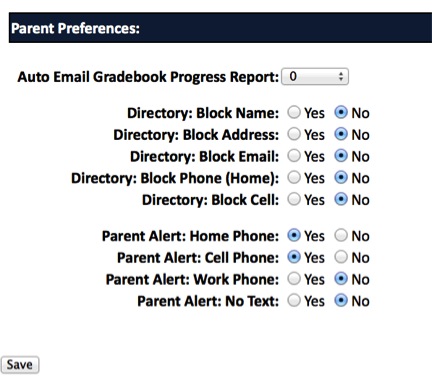
- Click on Family Demographic Form.
- Scroll to Student Medical/Custodial Parents/Emergency Contact Form, etc.
- Check all addresses and phone numbers for accuracy
- Update each Change or Preference.
- Choose yes or no to each option for the school directory.
- Choose yes or no to each option for Parent Alert.
- Click Save.
- Return to the main form and repeat for each Custodial Parent.
- Please review and update other forms as necessary.
SUBSCRIBE TO STUDENT CALENDARS
Staff, parents, and students can subscribe to your school calendar(s) to view events in their Google Calendar, Microsoft Outlook Calendar, Apple Calendar, or other calendars utilizing iCal.
Once subscribed, their calendar application will display events beginning from the first day of the previous month. For example, if you subscribed on August 16, 2023, events from July 1, 2023, forward will display.
Instructions:
- Open a Web Browser (Can not be done from the RenWeb Home app)
- From your Family Portal account, click School Information/Calendar.
- The School calendar displays.
- Click Subscribe.
- Subscription options display.
- Select all desired calendars.
- Highlight the displayed URL, copy, and paste into your preferred calendar application.
- Click OK to exit the dialog.
Click the links below for instructions on adding Family Portal calendar(s) to your:
- Google Calendar - select your device type (Computer, Android, iPhone, and iPad), then click Add using a link.
- Microsoft Outlook Calendar - scroll down to Subscribe to a calendar.
- Apple Calendar - select Subscribe to a calendar.
Continuing Students Re-enrollment
Those families with children currently enrolled in the school please look here for more information on re-enrollment and the steps in opening the enrollment packet.